
Bring in the file.
Upload the PDFs and photos, or choose them from Clio, OneDrive and SharePoint, Google Drive, Dropbox or ShareFile. Records that arrive later are added to the same case.
The CaseBuilder platform
CaseBuilder reads every page of the case for the claimant’s attorney, builds the argument from the record, and prepares the work product: the chronology, the exhibits and a demand that cites verified law. You review and decide every step.
Product walkthrough · 2:23
A fictional pedestrian case, in the app itself: the documents chosen from the firm’s files, the case read for the client, every fact opened at its page, the medical chronology, the exhibits, and a demand that cites the law the driver broke, each citation checked against its official text.
Works with Clio, OneDrive and SharePoint, Google Drive, Dropbox and ShareFile, or files from your computer.
Explore the sample case yourself →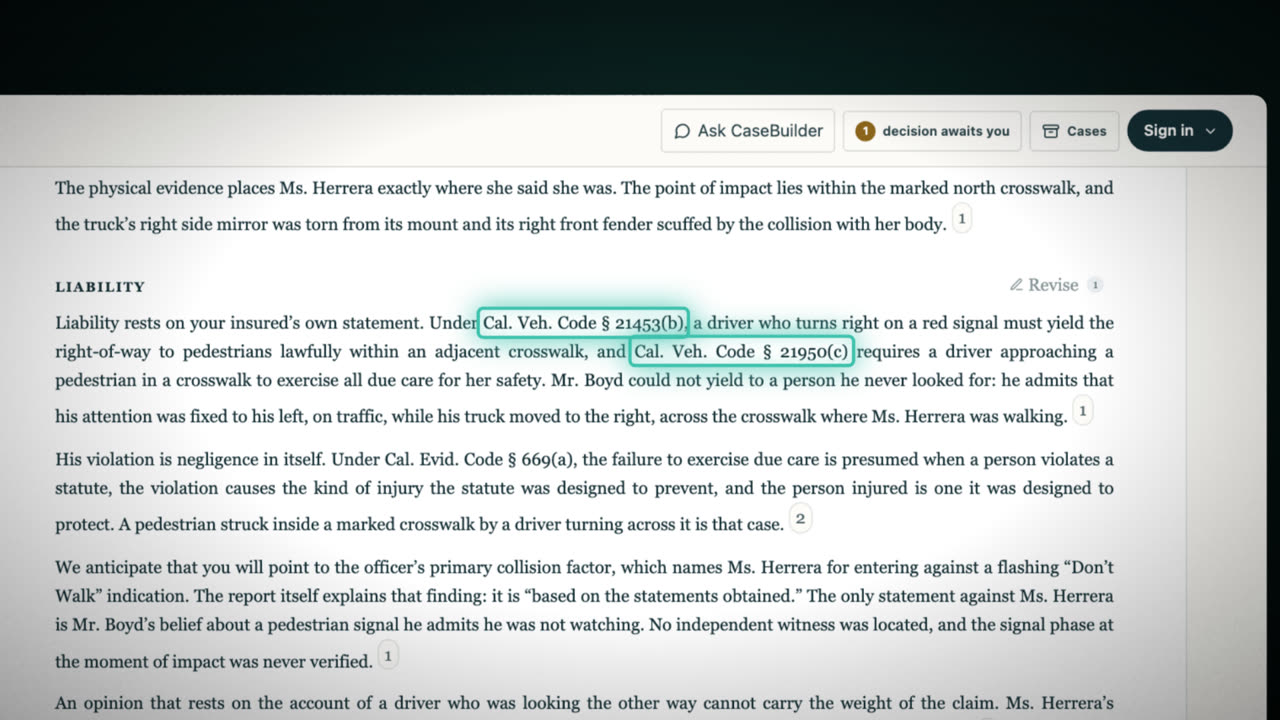 Watch the walkthrough2:23
How it works
Upload the PDFs and photos, or choose them from Clio, OneDrive and SharePoint, Google Drive, Dropbox or ShareFile. Records that arrive later are added to the same case.
CaseBuilder reads every page and lays out the case strategy: what the record supports, what it still lacks, where it contradicts itself, and what to do next.
The medical chronology, the exhibits and the demand, prepared from the record for your review. Your decisions stay with the case, version by version.
Everything in the case
Review the facts and the draft before using any output in your case.
The demand cites a statute or a case only after CaseBuilder has read its official text and found the words that state the rule.
From each state’s official code, with a link to read the section.
Published opinions of the state’s own courts, through CourtListener.
California, New York, Texas, Florida, Nevada, Arizona, Ohio, Michigan, North Carolina, Washington and the District of Columbia.
Your firm
With your firm email and a password, or with Google or Microsoft. Law firms are approved in minutes.
Invite your colleagues and choose their roles. Every case belongs to the firm, and every plan includes unlimited users.
CaseBuilder keeps no copy of the files you upload and never changes your repositories. Hosted in the United States under Google Cloud’s HIPAA Business Associate Agreement. Data security.
Your next case, with more clarity
Plans start at $299 a month, priced by the case, with up to 1,000 pages per case. Try your first case free. See platform pricing.